

Video Guide
Step-by-Step Guide
1
Go to 'Launch' followed by 'Select Creatives'
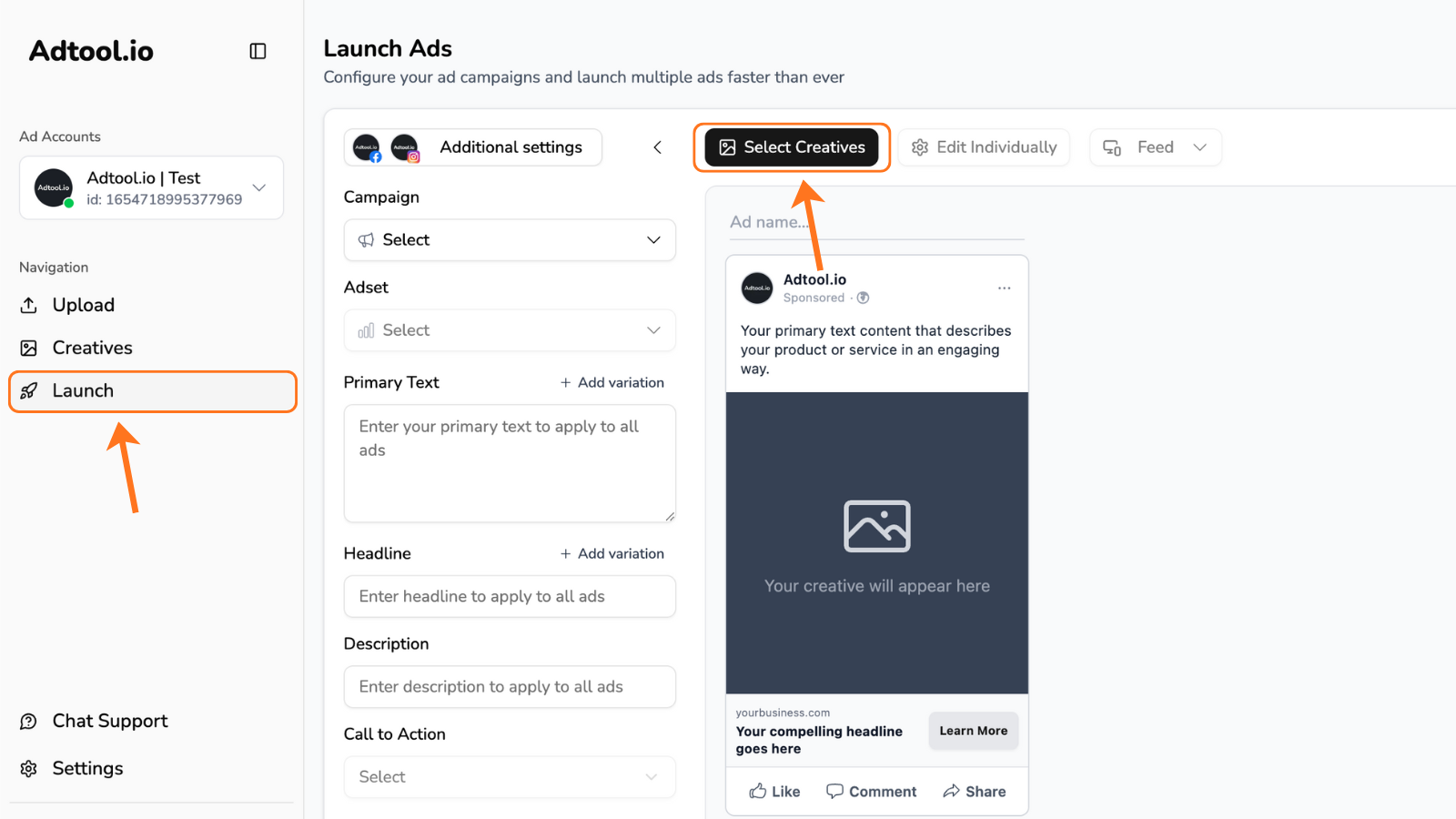
2
Select the creatives for your ads and click 'Continue'
TIP: Find your desired creatives by using filters and/or using ‘select all’ button.You can also click and drag the mouse to easily select your creatives.
3
Next step is to group the creatives for the ads
If two creatives share the same name - except for the dimension at the end - Adtool will recognize them as belonging to the same group.Dimension formats that we currently support:
1x1 & 9x16
1:1 & 9:16
1_1 & 1_1
1-1 & 1-1Example:
‘Video V6 9x16’ and ‘Video V6 4x5’ will automatically be grouped together.This allows you to easily launch ads in multiple aspect ratios without any manual setup.If the filenames don’t match, you can still group them manually with a simple drag and drop.
1x1 & 9x16
1:1 & 9:16
1_1 & 1_1
1-1 & 1-1Example:
‘Video V6 9x16’ and ‘Video V6 4x5’ will automatically be grouped together.This allows you to easily launch ads in multiple aspect ratios without any manual setup.If the filenames don’t match, you can still group them manually with a simple drag and drop.